


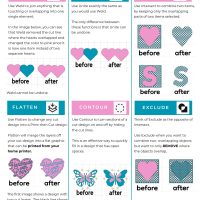


If you have always wanted to take a Cricut Design Space class and have someone just show you how to work the software, and you live in Minnesota then you are in luck! I will be teaching my Teach Me Cricut Design Space class on Sunday’s from 11am – 1pm in November – January!

You will learn how to use text, shapes, weld, slice, attach and so much more!
To sign up for the class go to
https://www.michaels.com/classes-and-events/classroom#id=cricut-101-class-msp-bloomington-1

If you don’t live in Minnesota, you can purchase a one on one video conference class with me through the Classes section of this site.
Keep following me and join my Teach Me Cricut Design Space group on Facebook!



2 Responses
I would like to physically try a Cricut machine (specifically, the Joy Xtra) before I buy it.
Unfortunately, apparently no Michael’s or Hobby Lobby that I can find and get to has live demonstrations.
And I will not risk the $ to buy a Cricut without trying it – especially when an associate at the HarMar Michael’s told me yesterday I could try a Cricut and return it there (which the Michael’s website very specifically said could not be returned if opened, and my crafting friend from Seattle told me that whatever substance the associate was on, she would like to try some 🤭).
And Google was not my friend, as none of the search results it provided me, searching for places where I could try a Cricut, even if I have to pay for a membership (I expected I would have to provide my own consumables), were valid.
Do you know of any places in the Twin Cities where I could try the Cricut Joy Xtra, even if I have to pay a membership fee to be able to do so?
What I would like to try is for me to cut from a sheet of Cricut Printable Iron-On for Dark Fabrics (I have these), likely with something I have to print from Cricut Design Space at the site, as I don’t have Design Space, and probably wouldn’t be able to use without a Cricut machine (of course I would pay the appropriate costs for printing).
Thank you!
I wish I had a Joy Xtra! I would let you come over and try it out. Can I ask why you are looking to get a Joy and not one of the Explore machines?
I can tell you for sure it will cut the Cricut printable iron on since the blade would be the same for any Cricut machine. Also, the power and force of how it cuts comes from the Design Space software. Also, Cricut Design Space is a free software you can download onto your computer.